Recently, I implemented an interesting scenario involving Linux networking and VPN. These were the requirements:
- Unprivileged LXC container running on Debian 13 host:
- All internet-bound traffic from the container is routed via remote VPN.
- Container must not be able to communicate with any other networks the host might be directly connected to.
- The container itself has no knowledge about the VPN.
- If the VPN does not work, the container can’t communicate with internet services.
- Debian 13 host:
- strongSwan handles IPSec IKEv2 connections with the remote VPN service.
- Network traffic originating from the host system is not routed via the VPN service.
- Remote IPSec IKEv2 VPN service:
- Not under our control.
- Assigns a single virtual IPv4 address.
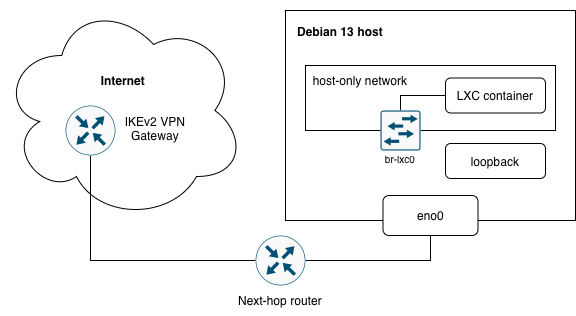
IPv4 ranges (RFC1918) used in the example
192.168.99.0/24– network the host is connected to192.168.222.0/24– host-only network for the container(s)10.9.8.7/32– VPN virtual IP
Let’s take a brief look at a base VPN configuration. It is very easy to configure a policy-based IKEv2 VPN for the host. Example swanctl.conf:
policy-based-vpn {
  version = 2

  local_addrs  = 192.168.99.98
  remote_addrs = remote-vpn-gateway.macadmin.cz
  vips = 0.0.0.0

  local {
    auth = pubkey
    id = vpn-client.macadmin.cz
  }

  remote {
      auth = pubkey
      id = remote-vpn-gateway.macadmin.cz
  }

  children {
    netvpn {
      remote_ts = 0.0.0.0/0
      start_action = trap
    }
  }
}
The challenge is how to make it work for the traffic originating from the container
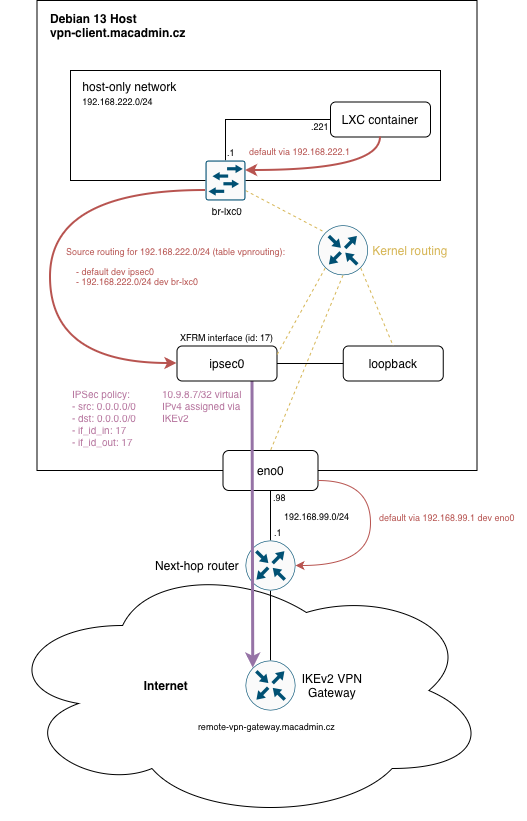
and exclude all traffic originating from the host system. The host only network 192.168.222.0/24, the container is connected to, will have to be NATed behind a single IPv4 address to match the 1:1 expectation of the VPN service. First I tried to come up with a solution using policy-based VPN configuration, but after some thinking I figured a route-based VPN might be a better fit for this situation.
The plan:
- Create XFRM interface
ipsec0and assign IPSec policy with match-all-traffic selector0.0.0.0/0. - Create source routing table which will apply to all traffic originating from the host-only network and use it to route the traffic to
ipsec0interface. - Use
nftablesto configure Source NAT onipsec0. - Make sure virtual IPv4 address assigned by the VPN server gets assigned to
ipsec0and not any another interface.
Prepwork
Install packages:
bridge-utilsnftablescharon-systemdstrongswan-swanctllibstrongswan-extra-pluginslibcharon-extra-plugins
Enable routing in kernel:
- Run
sysctl -w net.ipv4.ip_forward=1 - Check
/etc/sysctl.confto see if the setting is present.
Create vpnrouting source routing table:
mkdir -p /etc/iproute2/rt_tables.decho 100 vpnrouting >> "/etc/iproute2/rt_tables.d/vpnrouting.conf“
Configuring interfaces
ip link add ipsec0 type xfrm if_id 42 commands create a ipsec0 xfrm interface which is listed as ipsec0@NONE. However, this change is not persistent. The interface would have to be created via every boot via a hook script or a custom service.
I wanted a static configuration. Turns out this is not easily doable with ifupdown configuration in /etc/network/interfaces. There is a discussion post in the strongSwan GitHub repo which shows the static configuration can be done with system-network.
Debian 13 does not use systemd-network by default. Instead, NetworkManager is used for GUI installs and ifupdown for headless setups. I followed the Debian SystemdNetworkd article and:
- Disabled all
ifupdowninterface configuration files. - Created configuration files in the
/etc/systemd/networkdirectory (see below). - Enabled (
systemctl enable systemd-networkd) and started (systemctl start systemd-networkd) thesystemd-networkdservice.
br-lxc0.netdev
[NetDev]
Name=br-lxc0
Kind=bridge

[Bridge]
STP=false
ForwardDelaySec=0
br-lxc0.network
[Match]
Name=br-lxc0

[Network]
Address=192.168.222.1/24
ConfigureWithoutCarrier=yes

[Link]
ActivationPolicy=always-up

[Route]
Destination=192.168.222.0/24
Table=100
loopback.network
[Match]
Name=lo

[Network]
Xfrm=ipsec0
ipsec0.netdev
[NetDev]
Name=ipsec0
Kind=xfrm

[Xfrm]
InterfaceId=17
ipsec0.network
[Match]
Name=ipsec0

[Link]
ActivationPolicy=always-up

[Route]
Gateway=0.0.0.0
Table=100

[RoutingPolicyRule]
From=192.168.222.0/24
Table=100
There is one more thing. Systemd will happily override net.ipv4.ip_forward during system boot, thus disabling the routing. To prevent this from happening, make sure to set IPv4Forwarding=yes in /etc/systemd/networkd.conf.
With the systemd-networkd running, configuration can be inspected to check ipsec0 interface is present and source routing configured.
ip a
1: lo: <LOOPBACK,UP,LOWER_UP> mtu 65536 qdisc noqueue state UNKNOWN group default qlen 1000
    link/loopback 00:00:00:00:00:00 brd 00:00:00:00:00:00
    inet 127.0.0.1/8 scope host lo

2: eno0: <BROADCAST,MULTICAST,UP,LOWER_UP> mtu 1500 qdisc fq_codel state UP group default qlen 1000
    link/ether fe:dc:ba:09:87:65 brd ff:ff:ff:ff:ff:ff
    inet 192.168.99.98/24 brd 192.168.99.255 scope global dynamic noprefixroute eno0

3: br-lxc0: <BROADCAST,MULTICAST,UP,LOWER_UP> mtu 1500 qdisc noqueue state UP group default qlen 1000
    link/ether fe:dc:ba:09:87:64 brd ff:ff:ff:ff:ff:ff
    inet 192.168.222.1/24 brd 192.168.222.255 scope global br-private0

4: ipsec0@lo: <NOARP,UP,LOWER_UP> mtu 1500 qdisc noqueue state UNKNOWN group default qlen 1000
    link/none
ip rule
0:    from all lookup local
220:    from all lookup 220
32765:    from 192.168.222.0/24 lookup vpnrouting proto static
32766:    from all lookup main
32767:    from all lookup default
ip route list table vpnrouting
default dev ipsec0 proto static scope link
192.168.222.0/24 dev br-lxc0 proto static scope link
nftables configuration
/etc/nftables.conf
table inet filter {
    chain forward {
        type filter hook forward priority filter; policy drop;
        iifname "br-lxc0" oifname "ipsec0" accept
        iifname "ipsec0" oifname "br-lxc0" ct state established,related accept
    }

    chain nat {
        type nat hook postrouting priority srcnat; policy accept;
        oifname "ipsec0" masquerade
    }
}
Routing rules implicitly prevent the container traffic from going to undesirable places.
Explicit firewall configuration in the forward chain ensures this.
Source NAT configured with masquerade translates the source IPv4 of all packets leaving the ipsec0 interface before they are encapsulated. The new address is the virtual IPv4 address assigned by the VPN service and attached to the interface by strongSwan.
strongSwan configuration
/etc/swanctl/conf.d/connections.conf
route-based-vpn {
  version = 2

  local_addrs  = 192.168.99.98
  remote_addrs = remote-vpn-gateway.macadmin.cz
  vips = 0.0.0.0

  local {
    auth = pubkey
    id = vpn-client.macadmin.cz
  }

  remote {
      auth = pubkey
      id = remote-vpn-gateway.macadmin.cz
  }

  children {
    netvpn {
      local_ts = 0.0.0.0/0
      remote_ts = 0.0.0.0/0
      if_id_in = 17
      if_id_out = 17
      start_action = trap
    }
  }
}
Consider enabling dead pear detection (DPD) and appropriate action when that happens. Example values:
dpd_delay = 300s
children.netvpn.dpd_action = clear
Tell strongSwan to assign the virtual IP address onto ipsec0 interface by using install_virtual_ip_on key inn /etc/strongswan.conf:
charon {
    load_modular = yes
    plugins {
        include strongswan.d/charon/*.conf
    }
    install_virtual_ip_on = ipsec0
}

include strongswan.d/*.conf
I learned about this by reading a discussion in strongSwan GitHub repo. This GitHub issue is also somewhat relevant.
Conclusion
With all the pieces in place a reboot might be required. Alternatively make sure the services are restarted/reloaded in order:
systemd-networkdnftablesstrongswan